
How do I share my TidyCal booking link?
Copy your booking link from Booking types or the sidebar, or use the Share menu to open your own email app, X or LinkedIn. TidyCal no longer sends the email for you.
Where to Find Your Links
You have two kinds of link to share:
- Your booking page — every enabled booking type on one page, at tidycal.com/your-name. Open it from Booking page in the sidebar.
- A single booking type — takes someone straight to one type of meeting. Each card on the Booking types page has its own link.
Copy a Link
- From the sidebar: next to Booking page, click the copy icon (Copy booking link). The neighbouring icon, Open booking page, opens it in a new tab.
- From the Booking page screen: click Copy link next to your booking page address.
- From a booking type: on the Booking types page, click the link icon (Copy link) on that booking type's card.
Paste the link anywhere: an email, a message, your email signature, a social post or your website.
Use the Share Menu
- Go to Booking types.
- On the booking type you want to share, click the Share icon.
- Choose Copy link, Copy single-use link, Email, X (Twitter), LinkedIn or Copy review link.
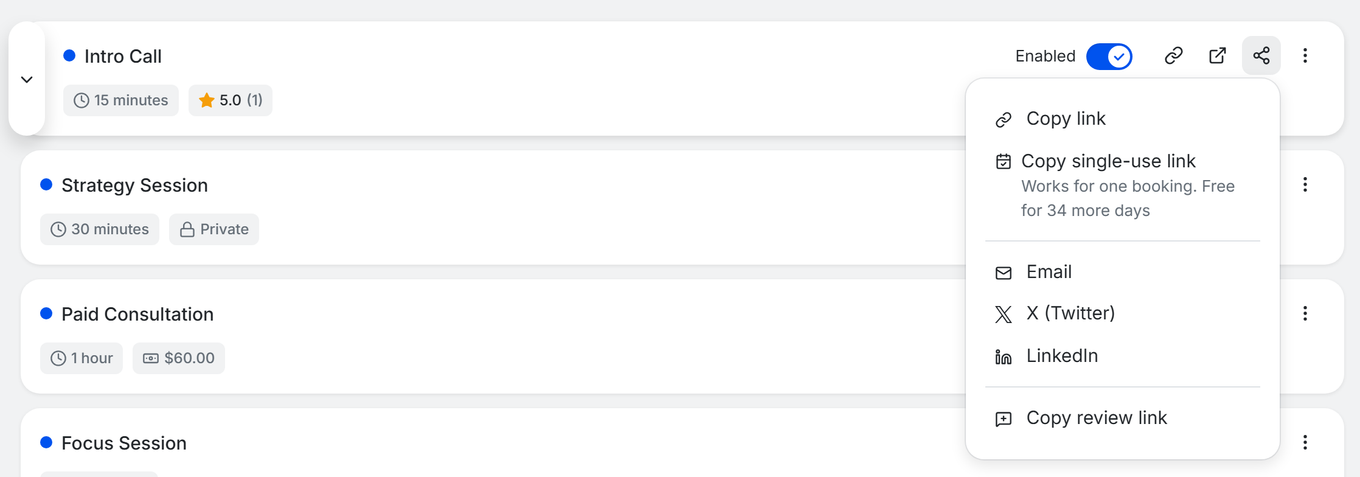
- Copy link copies that booking type's booking link, the same as the link icon on its card.
- Copy single-use link creates a link that works for one booking and copies it. The first person to book through it uses it up, and anyone who opens it afterwards sees This link has already been used. Single-use links are free for every account until December 5, 2026, and while that lasts the menu shows how many free days are left. After that they need Pro, apart from the first 30 days of a new account, and without access the item carries a PRO badge. Individual Lifetime and Agency Lifetime on their own do not include them. See single-use booking links.
- Email opens a new message in your own email app, with the booking type name as the subject and the link in the message. Add your recipients and send it yourself, from your own address.
- X (Twitter) and LinkedIn open that network's share window with your link ready to post.
- Copy review link copies the link where anyone can leave a review for that booking type. See Ratings and Reviews.
Until your booking page has had its first visitors or bookings, the sidebar shows a Share your booking page! button instead of the copy icons. It offers the same three channels for your whole booking page: Send an email, Post on X and Share on LinkedIn.
After You Create a Booking Type
The first time you save a new booking type, a window opens titled [your booking type's name] is live, with the line Send it to the people you want to book with. It has:
- The Booking link with a Copy link button.
- A Single-use link row with Copy single-use link (same access as in the Share menu above). It is not shown for date polls.
- Share via Email, X and LinkedIn.
- View booking page and Done.
![Window after the first save: '[Title] is live' with Copy link, Single-use link row, Share via Email, X, LinkedIn and Done](http://d33v4339jhl8k0.cloudfront.net/docs/assets/5a7dea9c2c7d3a4a4198fe11/images/6ae7166897a7f10ceb45b9ca/LIVE_booking-type-is-live.png)
Later saves of the same booking type do not open it; you can always use the Share menu on the booking type's card.
Share from Your Phone
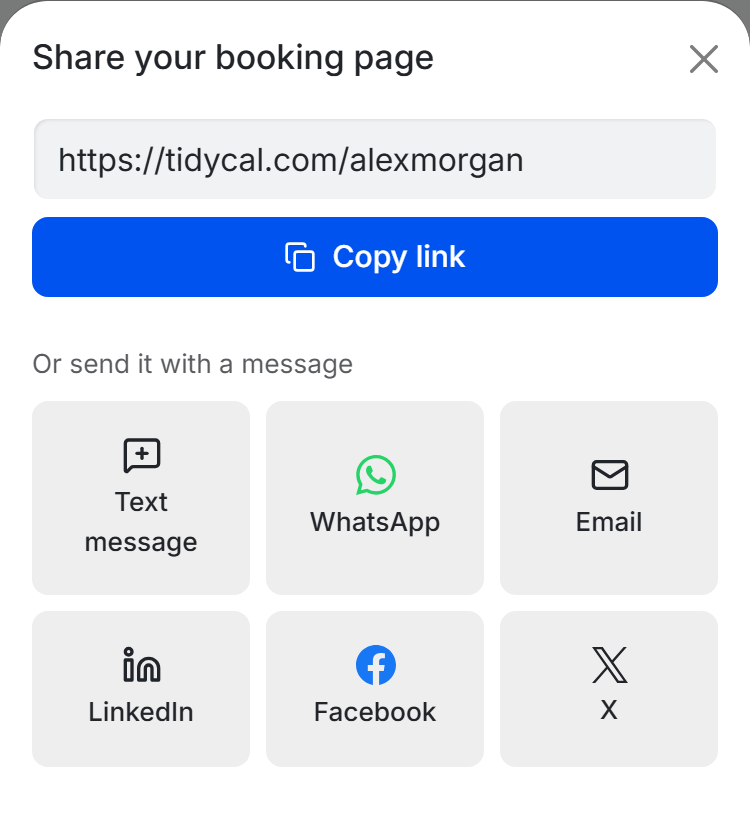
On a phone, tap Share in the bottom bar. The Share your booking page sheet shows your booking page link with a Copy link button, then ways to send it, such as Text message, WhatsApp, Email, LinkedIn, Facebook and X, plus More apps where your phone supports it.
TidyCal No Longer Emails Booking Links for You
TidyCal used to send booking-link emails to your contacts on your behalf. That was removed in September 2026 for security reasons. What this means:
- The Email option now opens your own email app instead of sending from TidyCal.
- The Emails page no longer has a Direct sends tab, and TidyCal keeps no log of links you share.
- The Contacts page no longer shows an emails-sent count.
The Emails page still handles automated emails sent before or after a booking. To email a mailing list, connect SendFox through Automations.
Put Your Booking Link on Your Website
You can also embed your booking page or a single booking type directly in a web page — see How to Embed TidyCal on Your Website.
Troubleshooting
Email opens my mail app instead of sending from TidyCal
- That is how it works now. The message is a draft in your own email app, so it comes from your address and replies reach you directly.
- Add recipients, edit the text if you want, and send it yourself.
Nothing happens when I click Email
- Your device has no default email app set for mail links. Set one, or use Copy link and paste the link into your email yourself.
I can't find the emails I sent from TidyCal
- The Direct sends log was removed along with the built-in sender. Messages you send from your own email app live in your sent folder.
Frequently Asked Questions
Can TidyCal email my contacts for me?
No. TidyCal prepares the message and your own email app sends it. The only emails TidyCal sends on your behalf are booking confirmations, reminders, automated booking emails, and booking invites you create for a guest. To bring people in from past meetings first, see How do I import contacts and invite them to book?.
What is my booking page link?
It is tidycal.com followed by your booking page name, and it lists every enabled booking type. Copy it from the sidebar next to Booking page.
Can I share one booking type instead of my whole page?
Yes. Every booking type card on the Booking types page has its own Copy link and Share options.
Can I make a booking link that works only once?
Yes. Open the Share menu on the booking type's card and click Copy single-use link. It is free for every account until December 5, 2026; after that it needs Pro, apart from the first 30 days of a new account. Individual Lifetime and Agency Lifetime on their own do not include it.
How do I send my link to a lot of people at once?
Use your own email tool. For mailing lists, connect SendFox through Automations and include your booking link in the campaign.
Share a Booking Type in TidyCal
➜ Open Booking types to copy a link or use the Share menu.