
Single-use booking links
A single-use booking link lets one person book you once. Copy one from Booking types → Share → Copy single-use link. Free for every account until December 5, 2026.
Overview
A single-use link is a booking link for one person and one booking. The guest opens it, sees your normal booking page for that booking type, picks any open time and books. Once they book, the link is used up. It suits a one-off call, a private offer or a client you do not want rebooking from a link you shared.
Who Can Create Single-Use Links
- Every account, free until December 5, 2026. Until then, any account can create single-use links, including the Free Plan.
- Your first 30 days. Any account can also create them during its first 30 days after sign-up.
- Pro. After that, creating single-use links needs Pro.
Individual Lifetime and Agency Lifetime on their own do not include it. For a team booking type, the plan of the team owner decides. Access is only needed to create a link: links you already created keep working after your access ends. See the plan comparison.
Create a Single-Use Link
- Go to Booking types in the sidebar.
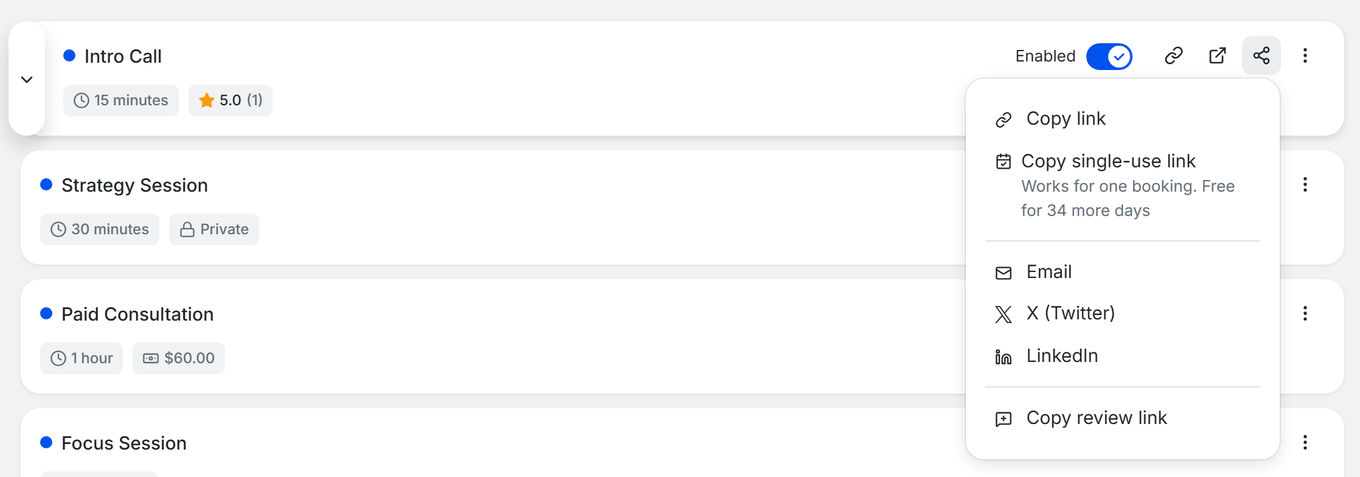
- On the booking type's card, click the Share icon.
- Click Copy single-use link. The button reads Creating link... and then Copied!.
- Paste the link into an email or message to the person.
Every click creates a new link. While you have free access, the menu shows a note such as “Works for one booking. Free for N more days”. Without access it shows a PRO badge, and clicking it opens the pricing page.

You can also create one right after you first save a new booking type. The window titled with your booking type's name and “is live” has a Single-use link row (“For one person, works for one booking.”) with a Copy single-use link button.
What the Guest Sees
- The link contains /single-use/ followed by a code. It opens the booking page for that booking type, not your reusable booking link.
- The guest picks any open time and books as usual. Paid booking types work the same way.
- When the booking is made, the link is spent. Opening it again shows This link has already been used and asks the guest to request a new link from you.

When a Link Becomes Available Again
- If the booking is cancelled before any payment was completed, the link can be used again.
- If a guest's payment fails, they can retry with the same link.
- Any other cancellation keeps the link spent. Create a new link if you want to invite them again.
Where Single-Use Links Are Available
- One-on-one and group booking types, and team booking types such as collective and round robin.
- Not for date polls, recurring or package booking types, or managed booking types that a team creates for its members.
- Only the person whose booking type it is can create the link.
Troubleshooting
The guest sees “This link has already been used”
- Someone has already booked with that link. Create a new single-use link and send it to the guest.
The guest sees “This link has expired”
- The page says the link is no longer valid. It is also shown when the booking type has been disabled. Check that the booking type is enabled, then create a new link.
I don't see Copy single-use link
- It is not offered for date polls, recurring or package booking types, or managed copies of a team's booking type.
- If the row shows a PRO badge, your account no longer has access. Upgrade to Pro to create more links.
“Could not create link”
- Try again. If it keeps failing, check that you are the owner of the booking type and that your account still has access, or contact TidyCal support.
Frequently Asked Questions
Which plans include single-use links?
Until December 5, 2026, every account can create them, including the Free Plan. After that you need Pro, apart from an account's first 30 days after sign-up. Individual Lifetime or Agency Lifetime alone do not include them.
Do my links stop working after December 5, 2026?
No. Links you already created keep working. Only creating new links needs access.
Can the same link be used by two people?
No. It works for one booking only. After someone books, create a new link for the next person.
Can I use a single-use link for a team booking type?
Yes. Collective and round robin booking types are supported, and the team owner's plan decides whether links can be created.