
Upgrading Your TidyCal Plan
Upgrade your TidyCal plan to Individual Lifetime, Pro, or Agency Lifetime — choose a one-time AppSumo deal or a monthly/yearly Pro subscription on TidyCal.
TidyCal Plans
TidyCal offers four plans — one Free, two one-time Lifetime deals from AppSumo, and a recurring Pro subscription billed by TidyCal:
- Free Plan — $0, just sign up.
- Individual Lifetime — $29 one-time, sold on AppSumo.
- Agency Lifetime — $79 one-time, sold on AppSumo. Adds teams, round robin and collective meetings, and SMS reminders.
- Pro — $12/month or $99/year, billed by TidyCal through Stripe. No TidyCal branding, custom domain, priority support, and no calendar, team-member or SMS caps.

For every feature by plan, see the full TidyCal plan comparison or tidycal.com/pricing.
Pro vs Agency Lifetime: Pro removes all TidyCal branding from your booking pages and includes a custom domain. Agency Lifetime keeps reduced TidyCal branding. Both plans include the same team features, but Agency Lifetime purchased on or after September 1, 2026 is capped at 4 team members including the owner, 10 calendar connections and 10 SMS segments per month, and does not include a custom domain; Agency Lifetime purchased before that date keeps 25 calendar connections, unlimited team members, 20 SMS segments per month and a custom domain. Pro has none of those caps. Pro is recurring; Agency Lifetime is one-time.
Platform fee by plan
Paid Stripe bookings carry TidyCal's 1% platform fee on the Free Plan, Individual Lifetime and Agency Lifetime; on a lifetime plan you choose who covers it in Settings → Bookings (I'll cover the 1% platform fee). Pro carries none. See Does TidyCal charge a fee on payments?
How to Subscribe to Pro
Pro is a recurring subscription billed by TidyCal via Stripe. You can subscribe at any time, regardless of whether you have a Lifetime plan.
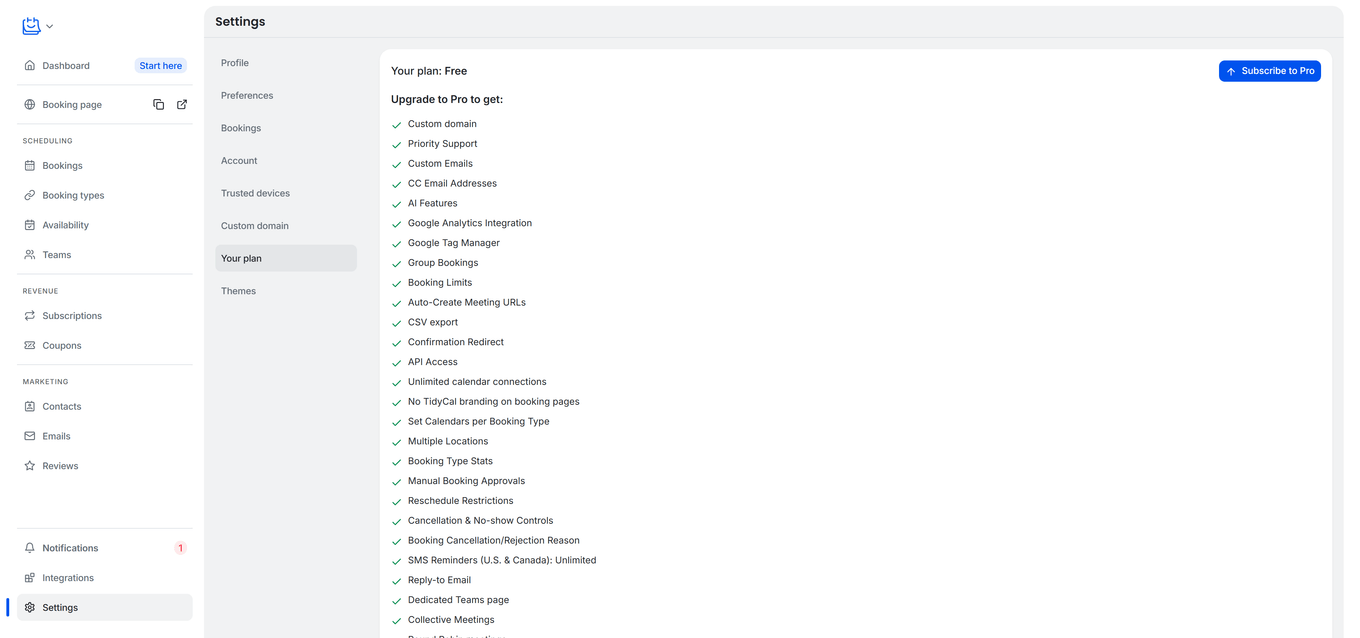
- Go to Settings → Your plan.
- Click Subscribe to Pro. This takes you to the Pricing page, where you choose the billing interval.
- On the Pro card, choose Monthly or Yearly using the billing toggle (Yearly shows its saving, about 31% compared to paying monthly).
- Click Subscribe on the Pro card.
- Complete the Stripe Checkout form with your payment details.
- After payment, you return to Settings → Your plan with the message “Welcome to Pro! Your subscription is now active.”
Pro features unlock immediately, including no TidyCal branding on your booking pages, custom domain, priority support, unlimited calendar connections and unlimited team members.
Pro is a paid subscription with no free trial. A free Agency Plan trial exists, but only for some Individual Lifetime accounts — see the Free Trial section below.
Manage Your Pro Subscription
Once you have an active Pro subscription, the Subscribe to Pro button on Settings → Your plan is replaced with a Manage subscription button. It opens the Stripe Customer Portal, where you can:
- Update your payment method
- Cancel your subscription (it continues until the end of the current billing period)
- Resume a cancelled subscription before it lapses
- View and download invoices
The same Manage subscription button is also on the Pro card on the Pricing page when you are signed in with an active Pro subscription.
Switch Between Pro Monthly and Pro Yearly
You can't start a second Pro subscription while one is active, so switching interval means cancelling and subscribing again:
- Go to Settings → Your plan → Manage subscription.
- In the Stripe Customer Portal, cancel your current subscription. It continues until the end of the current billing period.
- After your current period ends and your subscription is no longer active, return to Settings → Your plan and click Subscribe to Pro again.
- On the Pro card, choose the other interval (Monthly or Yearly) and complete checkout.
Your Pro features remain active until the original period ends.
When Your Pro Subscription Ends
If your Pro subscription is cancelled or fails to renew, the change takes effect at the end of the current billing period. When the period ends:
- Your account reverts to its underlying plan — Agency Lifetime, Individual Lifetime, or the Free Plan if you had no Lifetime plan.
- Your data is preserved: bookings, calendars, contacts, Stripe connection, and booking types all remain intact.
- Pro-only features are no longer available: no booker branding, priority support, and a custom domain unless your Lifetime plan includes one.
Combining Pro with an Agency or Individual Lifetime
If you already own an Agency Lifetime or Individual Lifetime plan, you can add Pro on top:
- Agency Lifetime + Pro: your account moves to the Pro tier, which gives you all Agency features plus full removal of TidyCal branding from your booking pages, and lifts the Agency caps.
- Individual Lifetime + Pro: your account moves to the Pro tier with all Pro features, including team features, custom domain, and no booker branding.
Use the same Subscribe to Pro flow described above. Your Lifetime plan stays on your account, and Settings → Your plan shows both, for example Individual Lifetime + Pro (Monthly). If you cancel Pro later, your account reverts to your Lifetime plan.
Upgrade Lifetime Plans via AppSumo
Lifetime plans (Individual and Agency) are sold through AppSumo, so buying a Lifetime plan or upgrading from Individual Lifetime to Agency Lifetime happens on AppSumo.
- Sign in to TidyCal and open the Pricing page.
- On the Agency Lifetime card, click Upgrade at AppSumo (shown if you bought Individual Lifetime on AppSumo).
- Complete the upgrade on AppSumo. For AppSumo's own steps, see Upgrading or downgrading my license.
Upgrade your existing licence rather than activating a second code on the same account — see How do I activate my AppSumo code. If you bought Individual Lifetime directly on TidyCal before lifetime plans moved to AppSumo, the Agency card shows an Upgrade for $… button instead, which upgrades you on TidyCal.
Apply an AppSumo License
If you bought TidyCal through AppSumo and your account still shows the Free Plan, there is no code to paste in: TidyCal matches a licence to the account whose email address matches your AppSumo activation email. Activate the code on AppSumo, and if the plan still does not appear, see How do I activate my AppSumo code, and why does my plan still show Free?
Free Trial (Agency Plan)
A free Agency Plan trial is offered on the Teams page to accounts that hold the original Individual Lifetime deal and have not used a trial before. No credit card is required. The Free Plan has no trial, and accounts that already include Agency features are not offered one.
- In the sidebar, click Teams.
- Scroll to the bottom of the page. If your account is eligible, you will see a Start Free Trial button with a line such as “… days of Agency Plan FREE. No credit card required.” showing the trial length.
- Click Start Free Trial. Your account immediately gains Agency Plan access for the trial period, including team booking pages, round robin, collective meetings, and SMS reminders.
- After the trial ends, your account goes back to Individual Lifetime unless you upgrade to Agency Lifetime via AppSumo or subscribe to Pro.

Not eligible or already used the trial? The same banner area shows Unlock Teams by upgrading instead. Click it to choose a paid plan.
After Upgrading
- Pro: features are available immediately, and “Welcome to Pro! Your subscription is now active.” appears on Settings → Your plan. Pro invoices are in the Stripe Customer Portal (Manage subscription).
- Lifetime via AppSumo: once AppSumo processes the upgrade, refresh Settings → Your plan to see your new plan.
- Lifetime plans bought directly on tidycal.com appear in Purchase history on Settings → Your plan, with invoice links.
- An active Agency Plan trial ends when a Lifetime plan is activated on your account. Subscribing to Pro does not end it.
Upgrade Paths Summary
| From | To | Price | How |
|---|---|---|---|
| Free Plan | Individual Lifetime | $29 one-time | AppSumo — click Buy on AppSumo on the Pricing page |
| Free Plan | Agency Lifetime | $79 one-time | AppSumo — click Buy on AppSumo on the Pricing page |
| Free Plan | Pro | $12/month or $99/year | TidyCal — Settings → Your plan → Subscribe to Pro |
| Individual Lifetime | Agency Lifetime | Set by AppSumo | AppSumo — Upgrade at AppSumo on the Pricing page |
| Individual Lifetime | Pro | $12/month or $99/year on top | TidyCal — Settings → Your plan → Subscribe to Pro |
| Agency Lifetime | Agency Lifetime + Pro | $12/month or $99/year on top | TidyCal — Settings → Your plan → Subscribe to Pro |
Troubleshooting
I purchased via AppSumo but I do not see my Lifetime plan in TidyCal
If your Lifetime plan does not appear in Settings → Your plan, your AppSumo licence may not be activated yet — activate it in your AppSumo account. If it is activated but TidyCal still shows the Free Plan, check that the TidyCal account you are signed in to uses your AppSumo email address — see How do I activate my AppSumo code, and why does my plan still show Free? — or contact TidyCal support.
Where is the upgrade to Agency button?
On the Pricing page, on the Agency Lifetime card: Upgrade at AppSumo if you bought Individual Lifetime on AppSumo, or Upgrade for $… if you bought it directly on TidyCal. Settings → Your plan shows Subscribe to Pro instead; it only shows an AppSumo Upgrade button once you already have Pro.
My Pro Stripe payment did not go through
- Verify your card details and try again.
- Try a different payment method in Stripe Checkout.
- If the issue persists, contact TidyCal support.
I subscribed to Pro but my new features aren't showing
- If Settings → Your plan shows “Your subscription is being activated. It may take a moment to appear.”, wait a moment and refresh the page.
- Once it is active, the page shows “Welcome to Pro! Your subscription is now active.” and your plan reads Pro.
- If your plan still shows the Free Plan, contact TidyCal support.
Frequently Asked Questions
Is Pro a subscription or a one-time payment?
Pro is a recurring subscription billed by TidyCal via Stripe, at $12/month or $99/year. Individual Lifetime ($29) and Agency Lifetime ($79) are one-time payments sold via AppSumo, with no recurring charges.
Does Pro have a free trial?
No. Pro is a paid subscription with no free trial. A free Agency Plan trial is offered on the Teams page to accounts holding the original Individual Lifetime deal (see Free Trial above); the Free Plan has no trial.
Can I get a refund after upgrading?
It depends on how you purchased:
- Lifetime via AppSumo: refunds follow AppSumo's refund process — contact AppSumo.
- Pro: cancel at any time from Settings → Your plan → Manage subscription; your subscription continues until the end of the current billing period and is not renewed. You can request a full refund within 7 days of your subscription purchase by contacting support; after that, subscription payments are non-refundable.
- Lifetime bought directly on tidycal.com: Request full refund or Downgrade to Individual Lifetime appears on Settings → Your plan for 60 days after purchase.
See How do I get a refund for my TidyCal plan?
I already own a Lifetime plan. Should I subscribe to Pro?
Subscribe to Pro on top of an Agency Lifetime if you want to remove all TidyCal branding from your booking pages and use the Website Builder without footer branding, or to lift the caps on Agency Lifetime bought on or after September 1, 2026. For an Individual Lifetime, subscribing to Pro adds team features, no booker branding, custom domain, and priority support.