
Look busy: make your calendar look in demand
Look busy hides some open times so your calendar looks in demand. Turn it on in Booking types → Restrictions. Free for every account until December 5, 2026.
Overview
Look busy hides a share of your open times from bookers, so a booking page with lots of space looks like it is in demand. It changes only what bookers are offered. Your availability settings stay the same, and you can still book any time yourself.
You choose how much to hide for each booking type: Kinda busy (about 1 in 10 times hidden), Pretty busy (about 1 in 5) or Slammed (about 1 in 3).
Who Can Use Look Busy
- Every account, free until December 5, 2026. Until then, Look busy is free for every account, including the Free Plan.
- Your first 30 days. Any account can also use Look busy for its first 30 days after sign-up, even after December 5, 2026.
- Pro. After that, Look busy needs Pro.
Individual Lifetime and Agency Lifetime on their own do not include Look busy. For a team booking type, the plan of the team owner decides. The editor shows how many free days are left. See the plan comparison and How to Upgrade Your TidyCal Plan (Lifetime or Pro).
How to Turn On Look Busy
- Go to Booking types in the sidebar and click the booking type to open it.
- Click Restrictions in the editor's left menu.
- Find the Look busy card and open its dropdown.
- Choose Kinda busy (1 in 10 hidden), Pretty busy (1 in 5 hidden) or Slammed (1 in 3 hidden). Choose Off to turn it off.
- Click Save.
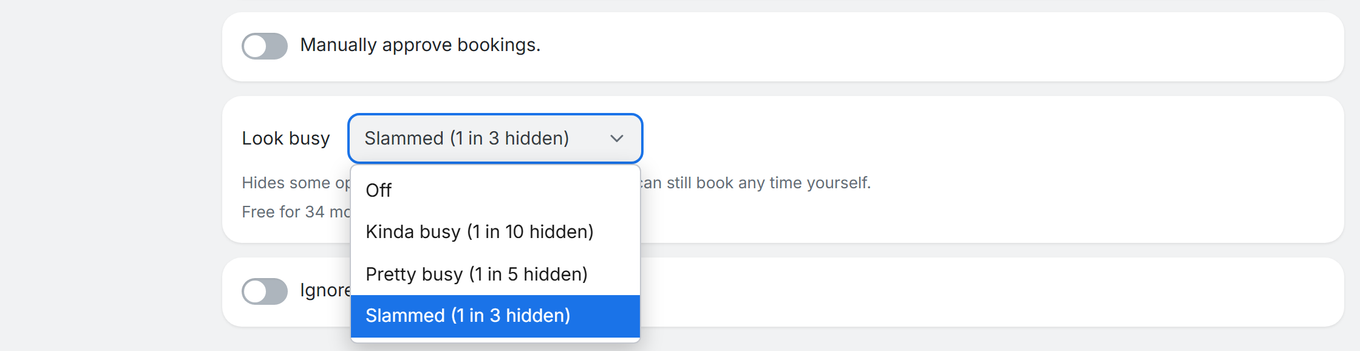
The card explains: “Hides some open times so you look in demand. You can still book any time yourself.” Look busy is not offered on date polls, or on recurring and package booking types.
How Look Busy Works
- The same times stay hidden. Hidden times are not picked at random for each visit. A given time is either hidden or shown, so every visitor and every refresh sees the same booking page.
- It is an approximation. “1 in 10”, “1 in 5” and “1 in 3” describe the share of times hidden, not an exact count for any one day.
- Every day keeps a time. A day that has open times always keeps at least one visible, so Look busy never empties a day on its own.
- Where it applies. Your public booking page, embedded booking pages, the phone layout, and the times returned by the API and AI assistants.
- Where it does not apply. When you create a booking yourself, in invites you send, and when you reschedule a booking as the host, you see every open time.
After December 5, 2026
Look busy then needs Pro, except during an account's first 30 days. If your account no longer has access, the level you saved is kept but ignored, and bookers see all of your open times. The dropdown is disabled and shows a Pro badge with the link Unlock Look busy by upgrading. If you get access again, your saved level applies again.
Troubleshooting
The Look busy dropdown is greyed out
- The account no longer has access. It shows a Pro badge and Unlock Look busy by upgrading. Upgrade to Pro, or see Who Can Use Look Busy above.
I don't see a Look busy card
- Look busy is not offered on date polls, or on recurring and package booking types. Open a standard booking type and go to Restrictions.
Bookers still see many times, or a day shows only one
- Hiding is a share of times, not an exact count, and every day with open times keeps at least one visible.
- If your plan no longer includes Look busy, all times show.
Frequently Asked Questions
Which plans include Look busy?
Until December 5, 2026, every account can use it, including the Free Plan. After that it needs Pro, apart from an account's first 30 days after sign-up. Individual Lifetime or Agency Lifetime alone do not include it.
What happens to my setting after December 5, 2026?
If your account does not have access, the level you saved is kept but ignored, so all your open times show. It applies again if you subscribe to Pro.
Are the hidden times random on every visit?
No. The same times stay hidden for every visitor and every refresh.
Does Look busy change my availability?
No. It only changes which open times bookers are offered. Your availability schedules are untouched, and you can still book any time yourself.