
What Happens When a Booking Payment Fails
When a client's card is declined on a paid booking, TidyCal holds the slot for about 4 hours and emails them a payment link. Turn it off in Settings → Bookings.
Overview
A declined card used to end the booking outright. TidyCal now treats it as recoverable: the slot is held, your client is emailed a link that reopens checkout, and the slot is only released if the hold runs out unpaid. The feature is called Revenue recovery, it is on by default, and it is available on every plan.
| What | Detail |
|---|---|
| How long the slot is held | About 4 hours from the moment the payment fails |
| Emails to your client | Two — about 30 minutes after the decline, then about 2 hours later |
| Payment providers | Stripe only |
| Plans | All plans (Free Plan, Individual Lifetime, Agency Lifetime, Pro) |
| Default | On |
Prerequisites
- Stripe connected as your payment provider — see Connect your Payment Services
- At least one booking type with a price — see How to Charge for Appointments with Paid Bookings
What Happens, Step by Step
From the moment your client's card is declined:
- The booking is kept and the slot stays blocked. Nobody else can book that time while the hold is running.
- The booking shows a Payment failed badge on your Bookings page.
- About 30 minutes later, your client gets an email titled "Complete your payment" with a link back to checkout. The delay is deliberate — most people who retry do so within minutes, in the same window, and an instant email would reach people who have already paid.
- About 2 hours after that, a reminder goes out — "Complete your payment" followed by the booking type name.
- If they pay, the booking confirms normally. Nothing else is needed from you.
- If the hold runs out unpaid, the slot is released and becomes bookable again.
The hold is measured from the failure, not from the booking. Retrying in the same checkout does not extend it; a new attempt from the email link that is declined again starts a new hold from that decline. If the appointment itself starts sooner than the hold would end, the hold stops at the start time instead.
What You See as the Host
TidyCal does not email you when a payment is declined. The booking simply appears on your Bookings page carrying a badge, and that badge is how you spot one:
- Paid — payment completed, booking confirmed
- Payment pending — no result from the payment yet
- Payment failed — declined, and currently being held
If you see Payment failed, the slot is being held and your client has already been emailed a link — or will be, within about 30 minutes of the decline. There is nothing you need to do.
What Your Client Sees
The Complete payment button in the recovery email reopens your booking page with their time already selected and their name and email filled in, so they only need to confirm the details and pay. The link creates a fresh payment attempt, which means an expired card or a one-off bank decline can simply be retried with different details.
The email also tells them how long they have, shown in their own timezone rather than yours. If they choose a different time instead, the original held slot is released as soon as the new booking is made.
Multi-date bookings. If your booking type sells a package or a set of sessions charged together, the whole set is one payment. Your client gets one email covering it, and the link carries every date — a package cannot be part-paid.
Turning the Hold Off
Go to Settings → Bookings and find the Revenue recovery card. The toggle is Hold the slot when a payment is declined.
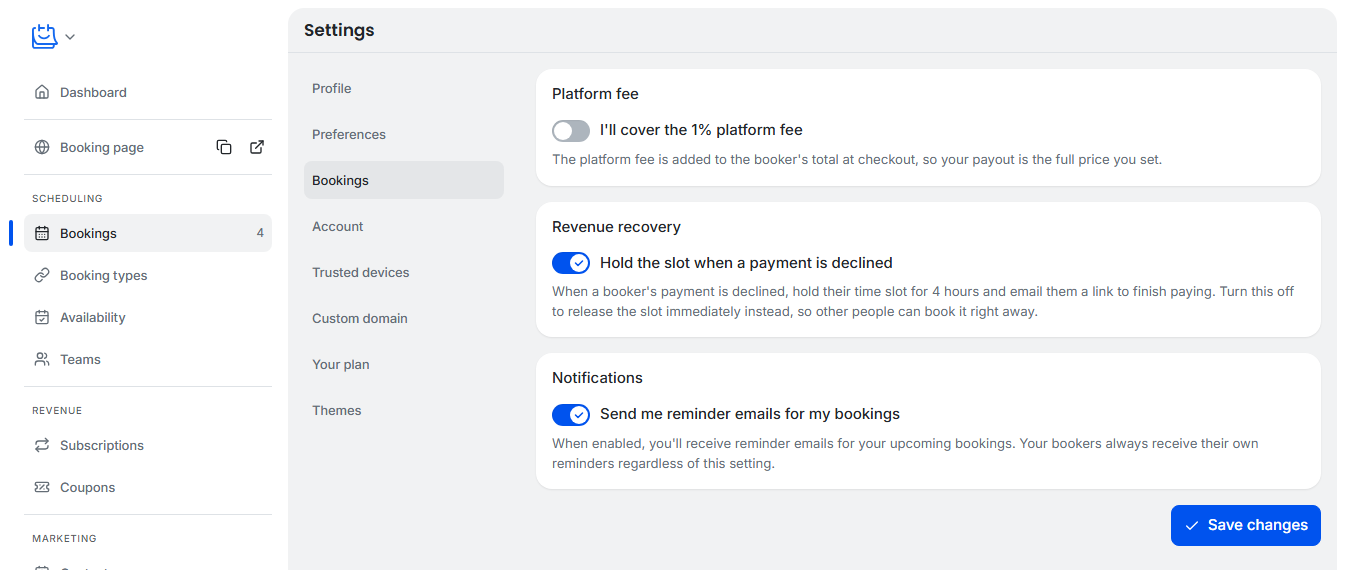
- Open Settings → Bookings.
- Switch Hold the slot when a payment is declined off.
- Click Save changes.
With it off, a declined booking's slot is released straight away so other people can book it immediately. The declined booking is cancelled and shows as Canceled on your Bookings page; the Payment failed badge only appears while a slot is being held.
Two things to know about this setting:
- It is account-level, not per booking type. There is no way to hold slots for one booking type and not another.
- On a team booking type it is the team owner's setting. An individual team member cannot opt their own bookings out of it.
Switching it off takes effect immediately for new declines. Slots already being held stay held until their hold ends (up to 4 hours after the decline), but no further recovery emails are sent. For the rest of the Settings pages, see How to Change Your TidyCal Account Settings.
Limitations
- Stripe only. A PayPal booking is only recorded once the payment succeeds, so there is no failed PayPal payment to recover.
- Payments still processing are treated separately. Some methods — bank debits in particular — can take hours or days to return a result. Those have not failed, so they are not held or released like a declined card: the booking stays in place while the payment is processing and confirms once it settles. See Enable Additional Stripe Payment Methods.
- Release notifications are limited. When a held slot is released, TidyCal emails your client ("Your booking was not confirmed") and you ("A booking was released because payment was not completed") only if the booking type uses approval before booking and you are on a paid plan. In every other case the slot is released quietly.
Troubleshooting
A slot is blocked by an unpaid booking and I want it back now
- Cancel the booking from your Bookings page. That releases the slot immediately instead of waiting for the hold to expire.
- To stop this happening again, switch off Hold the slot when a payment is declined in Settings → Bookings.
My client says they never got the email
- The first email is sent about 30 minutes after the decline, not instantly — if the card was declined a few minutes ago, it has not been sent yet.
- Ask them to check spam, and confirm the email address on the booking is correct.
- Nothing is sent once the hold has expired, and no email is sent if the appointment starts before the email is due. If the hold has expired, ask them to book again from your booking page.
The badge still says Payment failed after my client paid
- Paying from the recovery link creates a new booking for the same slot and releases the held one, so check for a newer entry showing Paid before assuming the payment did not land.
- Confirm the charge in your Stripe account. If Stripe shows it succeeded but TidyCal does not, contact support@tidycal.com with the booking and the Stripe payment reference.
The same client keeps getting declined
- Retrying in the same checkout does not extend the hold. A new attempt from the email link that is declined again starts a new hold from that decline.
- Declines come from their bank, not from TidyCal. Ask them to try a different card or payment method.
- If you have enabled additional payment methods in Stripe, they can pick a different one from the same recovery link.
Frequently Asked Questions
Is this the same as a cancellation or no-show fee?
No. This is an unpaid booking being given a second chance — no money has changed hands. A cancellation or no-show fee is a separate charge you can configure for clients who cancel or do not turn up.
My client's subscription payment failed. Is this the same thing?
No. This article is about a one-off booking payment. A failed subscription renewal is handled by Stripe, which retries on its own schedule and does not hold a booking slot.
Do I need to do anything when a payment fails?
No. The hold and both emails are automatic. The badge on your Bookings page is there so you know what is waiting, not because it needs action from you.
Which plan do I need?
None in particular — Revenue recovery works on every plan, including the Free Plan. You only need Stripe connected in order to take paid bookings at all.
Related Articles
- Connect your Payment Services — connect Stripe or PayPal and choose one per booking type
- How to Charge for Appointments with Paid Bookings — set a price on a booking type
- How do refunds and cancellation fees work for paid bookings? — charge a fee when a client cancels or does not turn up