
How to Customize Email Reminder Timing and Content
New booking types email reminders 1 hour and 1 day before. On paid plans, turn on Enable custom email reminders in Advanced → Notifications to change them.
Overview
TidyCal's Email Reminders feature sends automated reminder emails to attendees before their booking starts. You can configure up to 2 email reminders per booking type, choose from 10 timing options, and customize the subject line and message body. Pro and Agency Plan users also have access to SMS reminders for US and Canadian phone numbers.
| Feature | Free Plan | Individual Plan ($29) | Agency Plan ($79) | Pro ($12/month or $99/year) |
|---|---|---|---|---|
| Email reminders (default content) | 2 default reminders (1 hour and 1 day before) | Up to 2 per booking type | Up to 2 per booking type | Up to 2 per booking type |
| Custom email content (subject + body) | Not available | Full customization | Full customization | Full customization |
| SMS reminders | Not available | Not available | Up to 2 per booking type (US/Canada only); 10 SMS segments/month (20 if purchased before September 1, 2026) | Up to 2 per booking type (US/Canada only); unlimited SMS segments |
Prerequisites:
- An Individual Plan, Pro, or Agency Plan to customize email reminders (every plan, including the Free Plan, sends default reminders 1 hour and 1 day before)
- Pro or an Agency Plan for SMS reminders
- At least one booking type created
Setting Up Email Reminders
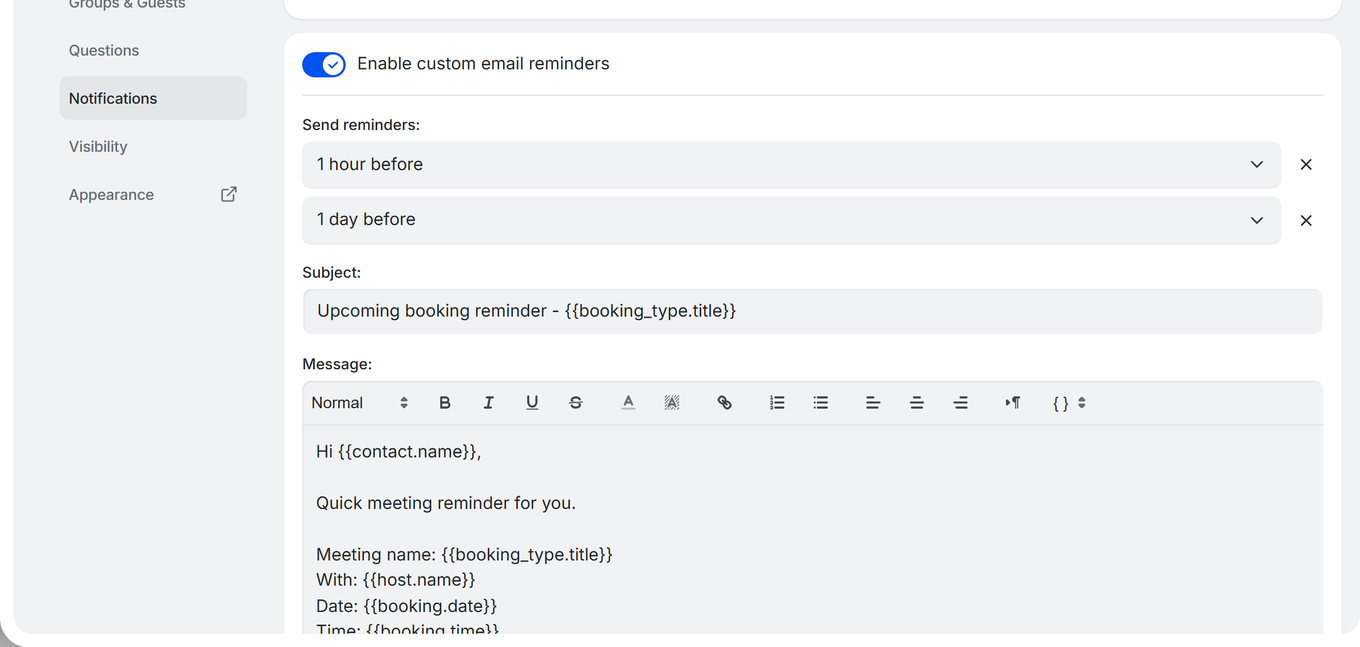
- Go to Booking types and click the booking type you want to edit.
- In the editor sidebar, expand Advanced, then click Notifications.
- Toggle on Enable custom email reminders.
- Select the timing for your first reminder from the dropdown.
- Optionally customize the Subject and Message fields (Individual Plan or higher).
- To add a second reminder, click Add reminder and select a different timing.
- Click Save at the top right of the editor.
Email Reminder Timing Options
Choose from 10 timing options for email reminders:
| Timing | When Sent |
|---|---|
| 15 minutes before | 15 min before booking start |
| 30 minutes before | 30 min before booking start |
| 1 hour before | 1 hour before booking start |
| 2 hours before | 2 hours before booking start |
| 4 hours before | 4 hours before booking start |
| 8 hours before | 8 hours before booking start |
| 1 day before | 24 hours before booking start |
| 2 days before | 48 hours before booking start |
| 3 days before | 72 hours before booking start |
| 1 week before | 7 days before booking start |
Customizing Reminder Content
With the Individual, Pro, or Agency Plan, you can customize the reminder email:
- Subject line: Default is
Upcoming booking reminder - {{booking_type.title}} - Message body: Use the rich text editor to write your reminder message
- Template variables: Insert dynamic content like
{{contact.name}},{{booking.date}},{{booking.time}}, and{{booking.meeting_url}}. See Template Variables Reference for the full list.
Managing Reminders
- Maximum: 2 email reminders per booking type
- Add: Click Add reminder to add a second reminder
- Remove: Click Remove reminder to delete a reminder
- Each reminder has its own timing; the subject and message are shared by both reminders
Turning Off Your Own Reminders
Reminders you receive as the host are controlled separately from the ones your bookers get. Go to Settings → Bookings and use the Notifications card:
- Send me reminder emails for my bookings is on by default and available on every plan.
- Switching it off stops your own reminder emails only. Your bookers always receive their own reminders regardless of this setting.
- On a team booking type, each host controls their own inbox — one host opting out does not affect the other hosts or the guest reminder.
See How to Change Your TidyCal Account Settings for the rest of that page.
SMS Reminders (Pro or Agency Plan)
Pro and Agency Plan users can send SMS text message reminders in addition to email reminders. SMS reminders are available for US and Canadian phone numbers only.
Setting Up SMS Reminders
- Go to Booking types and click the booking type you want to edit.
- In the editor sidebar, expand Advanced, then click Questions. Turn on Enable questions to attendees (or click Add another question), write a question such as "Mobile number", set Answer type to Phone number, and tick Required. SMS reminders are sent to the number attendees enter here.
- Under Advanced, click Notifications.
- Turn on Enable SMS reminders (Pro or Agency Plan).
- Select the timing for your SMS reminder.
- Optionally customize the message (max 160 characters).
- Click Save at the top right of the editor.
SMS Reminder Timing Options
SMS reminders have 6 timing options:
- 15 minutes before
- 30 minutes before
- 1 hour before
- 2 hours before
- 4 hours before
- 1 day before
SMS Reminder Limitations
- US and Canada only - SMS reminders are sent only to US and Canadian phone numbers
- 160 character limit - the SMS message you write is limited to 160 characters
- Max 2 SMS reminders per booking type
- Monthly SMS allowance - Agency Plan: 10 SMS segments per month (20 if purchased before September 1, 2026); Pro: unlimited. Long messages (after template variables are filled in) can use more than one segment. When the allowance is used up, SMS reminders are skipped for the rest of the calendar month, but email reminders still send
- Phone number question required - the booking type needs a Phone number question (Advanced → Questions), and the attendee must answer it with a US or Canadian number
Plan Requirements
- Free Plan: Default email reminders (1 hour and 1 day before); no custom reminders or SMS reminders
- Individual Plan ($29): Up to 2 custom email reminders per booking type
- Agency Plan ($79): Up to 2 custom email reminders + up to 2 SMS reminders per booking type, with 10 SMS segments per month (20 if purchased before September 1, 2026)
- Pro ($12/month or $99/year): Up to 2 custom email reminders + up to 2 SMS reminders per booking type, with unlimited SMS segments
To upgrade, go to Settings → Your plan.
Best Practices for Reducing No-Shows
- Use two reminders: Set one reminder 1 day before and another 1 hour before for best results.
- Include the meeting link: Use
{{booking.meeting_url}}so attendees can join with one click. - Keep SMS short: SMS has a 160-character limit, so focus on time and meeting link.
- Personalize the subject: Include
{{contact.name}}to increase open rates. - Add preparation details: Use the email reminder body to tell attendees what to prepare.
Troubleshooting
Reminders Not Being Sent
- Verify you clicked Save after enabling reminders.
- Reminders apply to every upcoming booking of that booking type, including bookings made before you enabled or changed them, as long as the reminder time has not already passed.
- Check that the booking is not cancelled - cancelled bookings do not receive reminders.
- If the booking is less than the reminder time away (e.g., booked 10 minutes before start with a 1-hour reminder), the reminder will not be sent.
SMS Reminders Not Received
- SMS is Pro or Agency Plan only. Verify your plan at Settings → Your plan.
- SMS only works with US and Canadian phone numbers.
- Ensure the attendee provided a valid phone number during booking.
- If the issue persists, contact support@tidycal.com.
Reminder Toggle Is Locked
- You are on the Free Plan.
- Solution: Upgrade to the Individual Plan ($29), Pro ($12/month or $99/year), or Agency Plan ($79).
Frequently Asked Questions
How many reminders can I set per booking type?
You can set up to 2 email reminders and (on the Pro or Agency Plan) up to 2 SMS reminders per booking type, for a maximum of 4 reminders total.
Do reminders apply to existing bookings?
Yes. Reminders apply to every upcoming booking of that booking type, including ones made before you enabled or changed them, as long as the reminder time is still in the future.
Can attendees opt out of reminders?
There is no opt-out mechanism for email reminders. SMS reminders are only sent if the attendee provided a phone number during booking.
Can I stop receiving reminders for my own bookings?
Yes. Go to Settings → Bookings and switch off Send me reminder emails for my bookings in the Notifications card. This affects only your inbox — your bookers keep receiving their reminders.
Can I customize what the reminder says?
Yes, with the Individual, Pro, or Agency Plan. You can customize both the subject line and message body, and use template variables for dynamic content like attendee name, booking date, and meeting link.