
Where can I find the roadmap?
Open Feedback in the sidebar (or tidycal.com/feedback), type your idea or feature request and send it to TidyCal. There is no voting roadmap in the app any more.
Overview
The Feedback page is a simple message form. It no longer shows a roadmap or a voting board: ideas are not ranked by votes, and you can't see other people's requests. Write what's working, what's annoying or what's missing, and send it to the TidyCal team. It is available to every logged-in user on every plan: Free Plan, Individual Lifetime, Pro and Agency Lifetime.
How do I send feedback or suggest a feature?
- Log in to your TidyCal account.
- In the sidebar, click Feedback, near the bottom between Integrations and Settings. On a phone, tap More, then Feedback. You can also go straight to tidycal.com/feedback.
- Type your message in the box under Send feedback. A message is required and can be up to 5,000 characters.
- Click the send button under the box. Your message goes out with your account email, shown next to the button as From.
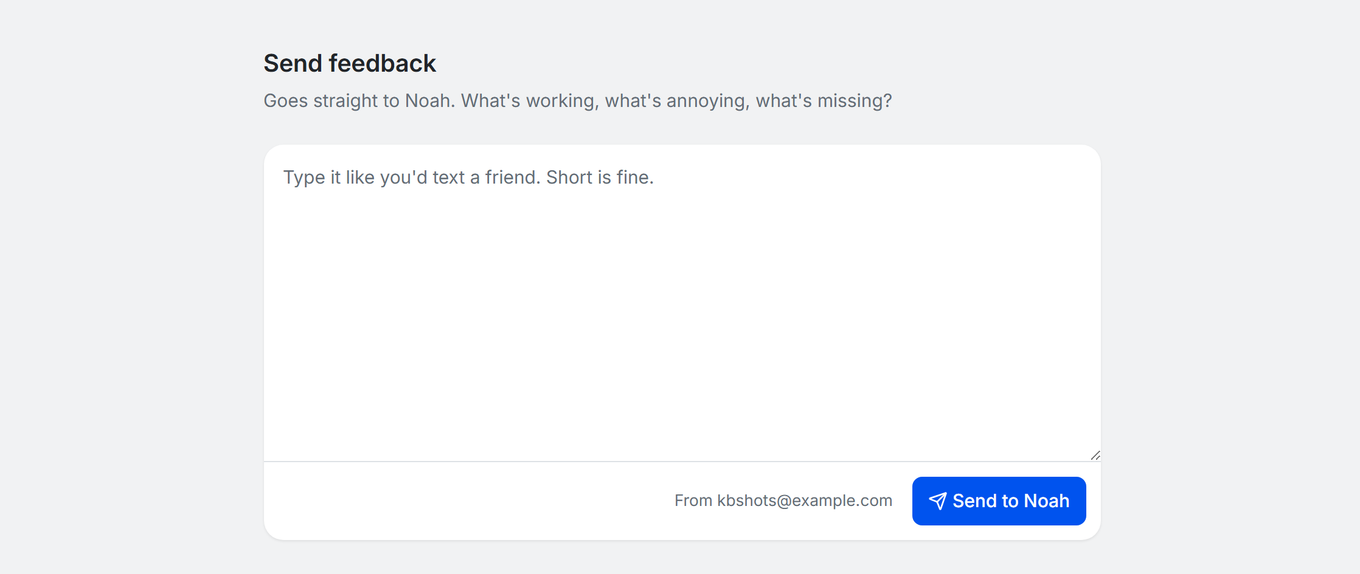
When it has been sent you see Thank you for the feedback!. Click Send another if you want to write another message.
Tips for Effective Feature Requests
- Be specific: Describe exactly what you want the feature to do and why it would be useful.
- Check what TidyCal already does: Some ideas are already possible. See What is TidyCal? and the TidyCal FAQ.
- Include use cases: Explain how the feature would help your workflow.
- Report bugs to support: Bugs and account problems go to support, not the Feedback page. See How do I contact TidyCal support?
Troubleshooting
My message did not send
- If you see "Sorry, that didn't send. Your message is still here, so please try again in a minute.", your text is still in the box. Wait a minute and click the send button again.
- If you see "You've sent a lot of feedback in the last few minutes. Please try again shortly.", wait a few minutes before sending more.
- "Write a message first." means the box is empty.
Cannot find the Feedback link
- The Feedback link is near the bottom of the sidebar, between Integrations and Settings. You can also go straight to tidycal.com/feedback.
- On mobile, tap More in the bottom navigation bar, then tap Feedback.
Frequently Asked Questions
Is the Feedback page available on all plans?
Yes. It is available to all TidyCal users who are logged in, including those on the Free Plan.
Is there still a roadmap or voting board?
No. The Feedback page no longer shows a roadmap or votes. To see what has already shipped, open What's new in TidyCal, which lists recent updates from the last six months, grouped as New, Improved and Fixed.
When will requested features be built?
There are no guaranteed delivery dates for feature requests. Feature timelines depend on development priorities and user demand. Individual responses to requests are not guaranteed. Common questions are answered in the TidyCal FAQ.
Can I submit feature requests through support?
Yes. You can also email feature ideas to support@tidycal.com. For bugs and account problems, always use support.